ANSYS Fluent Software Package
ANSYS FLUENT is software for fluid dynamics simulations. FLUENT has advanced solver technology that enables fast and accurate simulations. FLUENT contains physical models for a wide range of applications such as:
turbulent flows,
heat transfer,
chemical mixing ,
and combustion.
Additionally, user-defined functions (UDF) in FLUENT allow users to implement new models and extensively customise existing ones. FLUENT comes with Ansys Workbench, which also includes a geometry builder, a mesh builder and Ansys CFD-Post for analysis with advanced post-processing tools.
The package consists of three programs:
Gambit,
Tgrid,
and Fluent.
Gambit
It is intended for preparing the geometric model and block-structured hexahedral or simple tetrahedral meshes. A “bottom up” approach can be used, where the geometry is described in steps: points -> curves -> surfaces -> volumes. The other approach is the so-called “top down”, where the geometric model is created with Boolean operations between basic bodies (box, cylinder, sphere, …). Geometry can also be imported from third-party programs (Pro Engineer, Catia, …) in one of the standard formats.
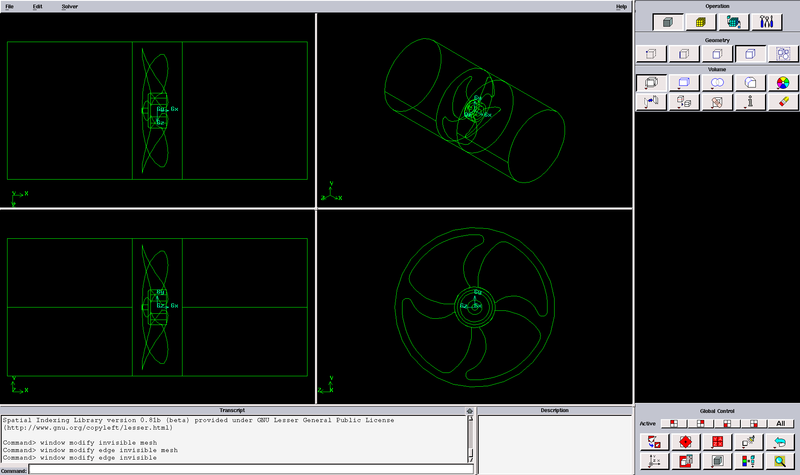
Start the program in a terminal window with the command:
gambit
Documentation:
/usr/local/Fluent.Inc/gambit2.4.6/help/index.htm
Tgrid
The program is intended for generating demanding 3D computational meshes. The basis is a surface mesh made in Gambit or geometry in one of the standard formats (STL, IDEAS, PATRAN, … ). You can choose between automatic and manual meshing. Various cell types are available: tetrahedra, prisms, pyramids, hexahedra.
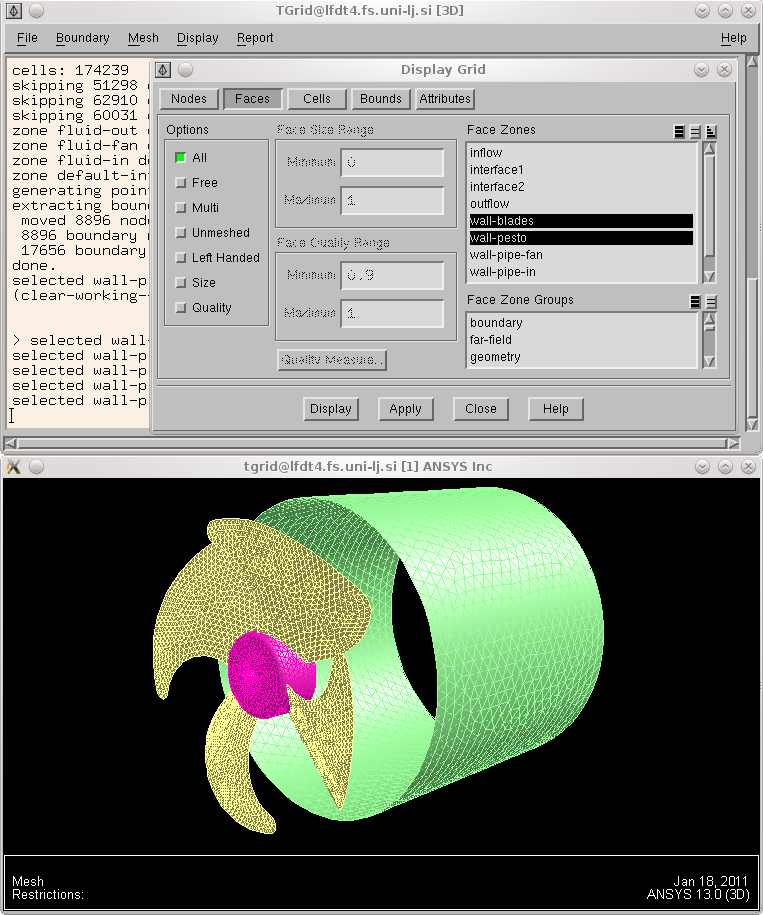
Start the program in a terminal window with the command:
tgrid
Documentation:
User's Guide: /usr/local/ansys/v130/tgrid/tgrid13.0.10/help/pdf/tgrid-ug.pdf
Tutorial Guide: /usr/local/ansys/v130/tgrid/tgrid13.0.10/help/pdf/tgrid-tg.pdf
Fluent
The program is intended for numerical simulation of fluid flow. One program combines
preprocessor - choice of viscous model, definition of boundary conditions, choice of solver, setting of simulation parameters
solver - solving the equations
postprocessor - analysis of results: velocity field, contours, isosurfaces, graphs, animations, …
Documentation:
Getting Started Guide: /usr/local/ansys/v130/commonfiles/help/en-us/pdf/flu_gs.pdf
User's Guide: /usr/local/ansys/v130/commonfiles/help/en-us/pdf/flu_ug.pdf
Tutorial Guide: /usr/local/ansys/v130/commonfiles/help/en-us/pdf/flu_tg.pdf
Running FLUENT under LSF: /usr/local/ansys/v130/commonfiles/help/en-us/pdf/flu_lsf.pdf
ANSYS FLUENT can be run in two ways: interactively (interactive mode) and in the background (batch mode). The first mode is used for preparing the simulation, shorter or test computations and analysis of results. The second mode is used for running long computations.
Interactive mode
After logging in to the login node, with the command in a terminal window
srun --partition=rome --ntasks=1 --time=4:00:00 --x11 --pty bash -i
we request an interactive session on one processor from the resource manager. When the system allocates a free node, start the Fluent Launcher with the command:
fluent
A window appears where we select the solver (serial or parallel), the number of parallel processes (cores) and the computational precision (single or double). Computations are not run directly on the compute nodes but through the SLURM resource manager, so tick the Use Job Scheduler option (scheduler SLURM).
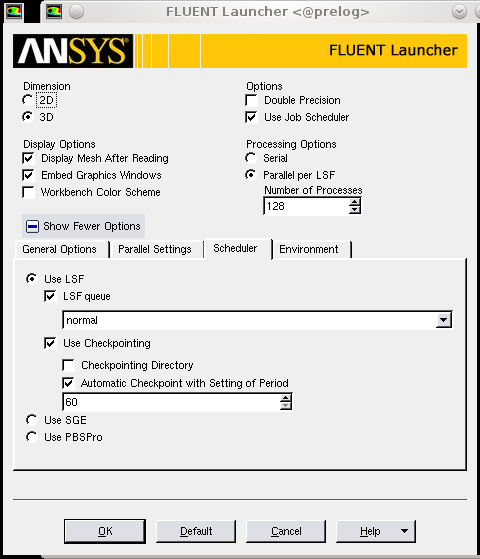
After confirmation, the main fluent process starts, where we set the simulation parameters and start the computation.
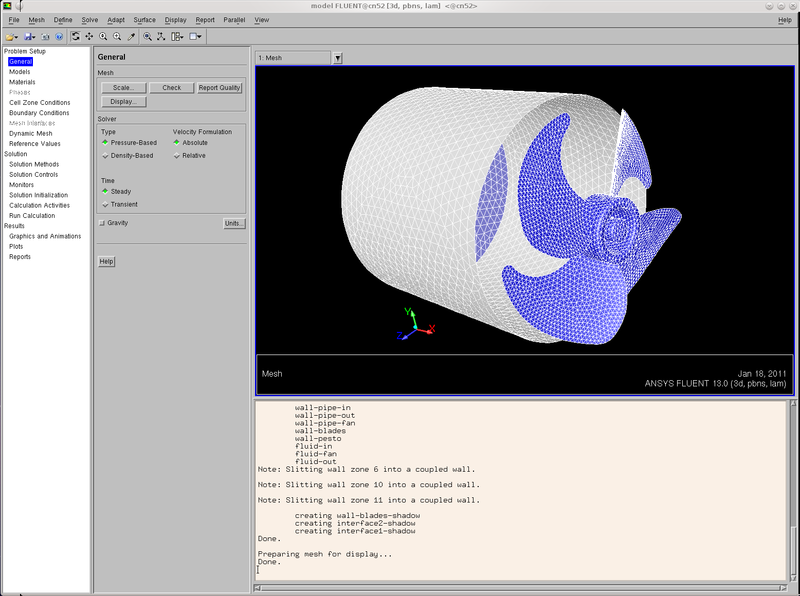
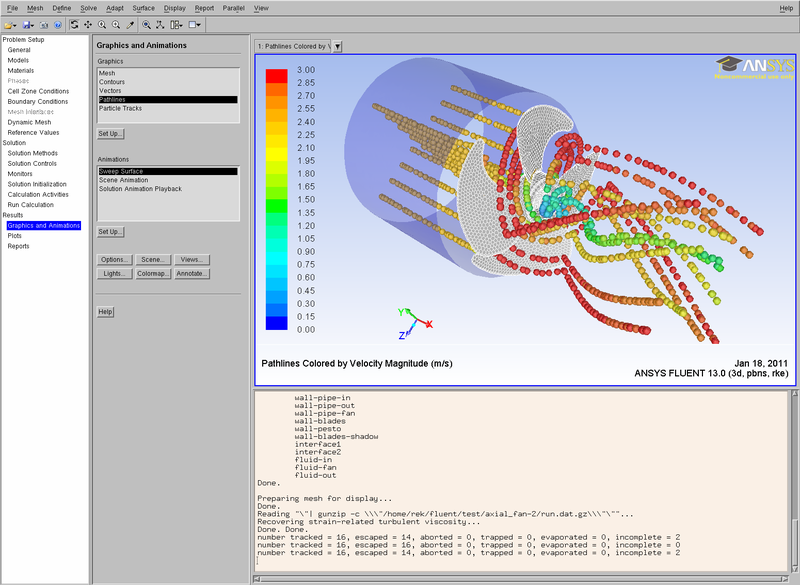
Computation result - pathlines for a fan in a pipe (Zlatko Rek, LFDT)
Batch mode
After logging in to the login node, prepare the job script fluent.sh
#!/bin/bash
#SBATCH --job-name=fluent
#SBATCH --partition=rome
#SBATCH --ntasks=64
#SBATCH --ntasks-per-core=1
#SBATCH --mem=100G
#SBATCH --time=24:00:00
module load ansys
scontrol show hostnames $SLURM_JOB_NODELIST > hosts.txt
fluent 3d -g -t$SLURM_NTASKS -cnf=hosts.txt -i ukazi.jou -ssh
then with the command
sbatch fluent.sh
we submit the job to the resource manager, which distributes it to free nodes.
Where:
sbatch ÷ pošiljanje batch posla SLURM-u
--ntasks=64 ÷ uporabo 64 jeder
   fluent 3d ÷ verzija fluent solverja
          -g ÷ brez grafike
-t$SLURM_NTASKS ÷ 64 paralelnih procesov
-cnf=hosts.txt ÷ seznam vozlišč, ki jih je dodelil SLURM
-i ukazi.jou ÷ datoteka z ukazi fluentu
        -ssh ÷ uporaba ssh protokola za prijavo na vozlišča
When running a long simulation, it is advisable to enable periodic saving of data in the journal file, e.g.
/file/auto-save/data-frequency 100
with which fluent saves the case and data every 100 iterations. This avoids data loss in case of an unexpected stop, system crash or reaching the --time limit, since the computation can be continued from the last saved data.
If you want to test a batch simulation, you can use a test case of data and command files:
/opt/lsf/gui/lsf/7.0/plugin/lsf/test-cases/Fluent.Inc/fluent-test.cas.gz
/opt/lsf/gui/lsf/7.0/plugin/lsf/test-cases/Fluent.Inc/fluent-test.jou
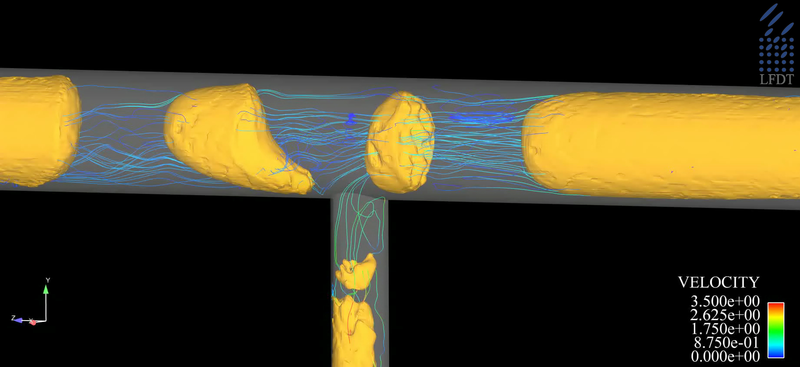
Example of a numerical simulation of two-phase flow separation in a mini manifold (Jurij Gregorc, LFDT).
Questions and answers
Q1: I haven’t looked into the command in depth, but the man page for srun says it should be run inside a SLURM allocation.
Anyway, I run into problems with this command as well:
Warning: Permanently added '10.0.2.157' (RSA) to the list of known hosts.
jmenccxf@10.0.2.157's password:
<>
~/>module load ansys
Loading ansys/13.
A1: Switches for the fluent solver:
 -cnf=hosts.txt ...seznam vozlišč iz scontrol show hostnames $SLURM_JOB_NODELIST
-pib          ...infiniband, privzeto - lahko izpustiš
-mpi=hp|intel ...privzeto hp - lahko izpustiš
-ssh          ...MPI uporablja ssh oz. FLUENT_SSH med vozlišči
From prelog, submit in batch mode with the command:
sbatch --partition=rome --ntasks=8 --ntasks-per-core=1 --time=24:00:00 --job-name=flut --output=out.txt --wrap='scontrol show hostnames $SLURM_JOB_NODELIST > hosts.txt; fluent 3ddp -g -t8 -cnf=hosts.txt -ssh -i input'
Longer jobs can be saved periodically with the fluent auto-save (every N iterations) in the input journal:
/file/auto-save/data-frequency N
A job is stopped with scancel ID and continued by submitting a new job that reads the last saved case and data files.
Programski paket ANSYS Fluent
ANSYS FLUENT je programska oprema za simulacije dinamike fluidov. FLUENT ima napredno solver tehnologijo katera omogoča hitre in natančne simulacije. FLUENT vsebuje fizikalne modele za širok spekter uporabe kot so:
turbulentni tokovi,
prenos toplote,
kemična mešanja ,
in zgorevanja.
Prav tako, uporabniško definirane funkcije (UDF) v FLUENT-u omogočajo izvajanje novih modelov uporabnika in obsežno prilagajanje obstoječih. FLUENT prihaja z Ansys Workbench, ki prav tako vsebuje geometrijo graditelja, mreže graditelja in Ansys CFD-Post za analizo z naprednimi po obdelavo orodji.
Paket sestavljajo trije programi:
Gambit,
Tgrid,
in Fluent.
Gambit
Namenjen je pripravi geometrijskega modela in blok-strukturiranih heksaedričnih ali enostavnih tetraedričnih mrež. Uporabimo lahko “bottom up” pristop kjer geometrijo opišemo s koraki: točke -> krivulje -> ploskve -> volumni. Drugi pristop je t.i. “top down”, kjer geometijski model ustvarimo z boolovimi operacijami med osnovnimi telesi (kvader, valj, krogla, …). Možen je tudi uvoz geometrije iz tretjih programov (Pro Engineer, Catia, …) v enem izmed standarnih formatov.
Program poženemo v terminalskem oknu z ukazom:
gambit
Dokumentacija:
/usr/local/Fluent.Inc/gambit2.4.6/help/index.htm
Tgrid
Program je namenjen generaciji zahtevnih 3D računskih mrež. Osnova je površinska mreža narejena v Gambitu ali geometrija v enem izmed standarnih formatov (STL, IDEAS, PATRAN, … ). Izbiramo lahko med avtomatskim in ročnim mreženjem. Na voljo so razni tipi celic: tetraedri, prizme, piramide, heksaedri.
Program poženemo v terminalskem oknu z ukazom:
tgrid
Dokumentacija:
User's Guide: /usr/local/ansys/v130/tgrid/tgrid13.0.10/help/pdf/tgrid-ug.pdf
Tutorial Guide: /usr/local/ansys/v130/tgrid/tgrid13.0.10/help/pdf/tgrid-tg.pdf
Fluent
Program je namenjen numerični simulaciji toka tekočine. V enem programu so združeni
predprocesor - izbira viskoznega modela, definicija robnih pogojev, izbira solverja, nastavitev parametrov simulacije
solver - reševanje enačb
postprocesor - analiza rezultatov: hitrostno polje, konture, izoploskve, grafi, animacije, …
Dokumentacija:
Getting Started Guide: /usr/local/ansys/v130/commonfiles/help/en-us/pdf/flu_gs.pdf
User's Guide: /usr/local/ansys/v130/commonfiles/help/en-us/pdf/flu_ug.pdf
Tutorial Guide: /usr/local/ansys/v130/commonfiles/help/en-us/pdf/flu_tg.pdf
Running FLUENT under LSF: /usr/local/ansys/v130/commonfiles/help/en-us/pdf/flu_lsf.pdf
ANSYS FLUENT poganjamo na dva načina: interaktivno (interactive mode) in v ozadju (batch mode). Prvi način uporabimo za pripravo simulacije, krajših oz. testnih izračunov ter analizo rezultatov. Drugi način uporabimo za poganjanje dolgotrajnih izračunov.
Interactive mode
Po prijavi v nadzorno vozlišče z ukazom v terminalskem oknu
srun --partition=rome --ntasks=1 --time=4:00:00 --x11 --pty bash -i
od nadzornika računskih virov zahtevamo interaktivno sejo na enem procesorju. Ko nam sistem dodeli prosto vozlišče, poženemo Fluent Launcher z ukazom:
fluent
Pojavi se okno, kjer izberemo solver (serijski ali paralelni), število paralelnih procesov (jeder), natančnost računanja (enojna ali dvojna). Izračunov ne poganjamo direktno na računskih vozliščih, ampak preko nadzornika računskih virov SLURM, zato obkljukamo opcijo Use Job Scheduler (scheduler SLURM).
Po potrditvi se požene glavni fluent proces, kjer nastavimo parametre simulacije in poženemo računanje.
Rezultat izračuna - tokovnice (pathlines) za ventilator v cevi (Zlatko Rek, LFDT)
Batch mode
Po prijavi v nadzorno vozlišče pripravimo skripto fluent.sh
#!/bin/bash
#SBATCH --job-name=fluent
#SBATCH --partition=rome
#SBATCH --ntasks=64
#SBATCH --ntasks-per-core=1
#SBATCH --mem=100G
#SBATCH --time=24:00:00
module load ansys
scontrol show hostnames $SLURM_JOB_NODELIST > hosts.txt
fluent 3d -g -t$SLURM_NTASKS -cnf=hosts.txt -i ukazi.jou -ssh
nato z ukazom v terminalskem oknu
sbatch fluent.sh
pošljemo posel nadzorniku računskih virov, ki ga razporedi po prostih vozliščih.
Pri čemer pomeni:
sbatch ÷ pošiljanje batch posla SLURM-u
--ntasks=64 ÷ uporabo 64 jeder
   fluent 3d ÷ verzija fluent solverja
          -g ÷ brez grafike
-t$SLURM_NTASKS ÷ 64 paralelnih procesov
-cnf=hosts.txt ÷ seznam vozlišč, ki jih je dodelil SLURM
-i ukazi.jou ÷ datoteka z ukazi fluentu
        -ssh ÷ uporaba ssh protokola za prijavo na vozlišča
Če poganjamo dolgotrajno simulacijo je primerno v ukazni datoteki vklopiti sprotno shranjevanje, npr.
/file/auto-save/data-frequency 100
s katerim fluent na vsakih 100 iteracij shrani case in data datoteki. S tem se izognemo izgubi podatkov ob nepričakovani ustavitvi, sesutju sistema ali poteku časovne omejitve --time, saj lahko izračun nadaljujemo od zadnjih shranjenih podatkov.
Če želimo preizkusiti delovanje batch simulacije, lahko uporabimo testni primer podatkovne in ukazne datoteke:
/opt/lsf/gui/lsf/7.0/plugin/lsf/test-cases/Fluent.Inc/fluent-test.cas.gz
/opt/lsf/gui/lsf/7.0/plugin/lsf/test-cases/Fluent.Inc/fluent-test.jou
Primer numerične simulacije separacije dvofaznega toka v mini razdelilniku (Jurij Gregorc, LFDT).
Vprašanja in odgovori
Q1: Nisem se sicer poglabljal v ukaz, vendar man page za srun pravi, da se ga izvaja znotraj SLURM alokacije.
Sicer pa tudi s tem ukazom naletim na težave:
Warning: Permanently added '10.0.2.157' (RSA) to the list of known hosts.
jmenccxf@10.0.2.157's password:
<>
~/>module load ansys
Loading ansys/13.
A1: Stikala za fluent solver:
 -cnf=hosts.txt ...seznam vozlišč iz scontrol show hostnames $SLURM_JOB_NODELIST
-pib          ...infiniband, privzeto - lahko izpustiš
-mpi=hp|intel ...privzeto hp - lahko izpustiš
-ssh          ...MPI uporablja ssh oz. FLUENT_SSH med vozlišči
S preloga submitaš v batch načinu z ukazom:
sbatch --partition=rome --ntasks=8 --ntasks-per-core=1 --time=24:00:00 --job-name=flut --output=out.txt --wrap='scontrol show hostnames $SLURM_JOB_NODELIST > hosts.txt; fluent 3ddp -g -t8 -cnf=hosts.txt -ssh -i input'
Daljše posle lahko sproti shranjuješ s fluentovim samodejnim shranjevanjem (na vsakih N iteracij) v ukazni datoteki:
/file/auto-save/data-frequency N
Posel ustaviš z scancel ID in ga nadaljuješ z novim poslom, ki prebere zadnji shranjeni case in data datoteki.