Unigraphics NX
Siemens (Unigraphics) NX is a geometric modeller that supports synchronous modelling. NX is installed on HPCFS together with its documentation (help). On a free node you run it with
  module load ugs
 srun --partition=rome --ntasks=1 --x11 --pty ugii
For the course Modeliranje prostora, Prof. J.Duhovnik and I.Demšar adapted “Zbirka vaj - delovni učbenik za NX (exercise collection – NX workbook)”, which is available in the FS library.
For a short test of the modeller, do the following: 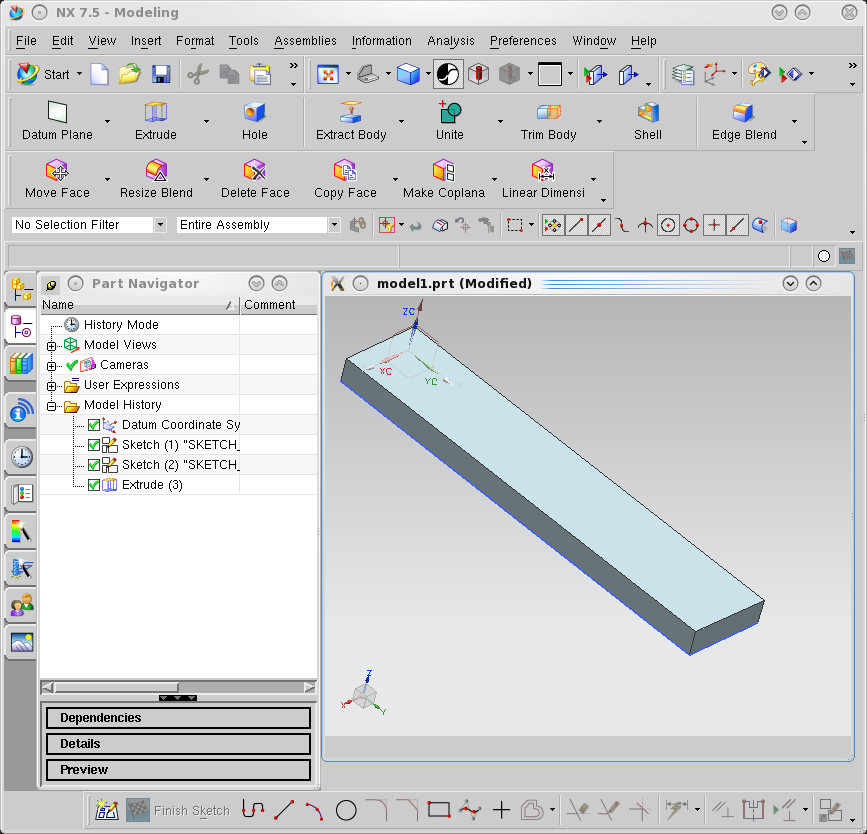
After starting with ugii, select New or press Ctrl+N and OK with the default model options.
In the menu, select Insert -> Sketch
Select a plane in space by clicking and then OK
Draw a rectangle with the R key by clicking two points on the plane, then OK
Finish sketching in the plane with Ctrl+Q or Finish Sketch…
Select Extrutde with the X key, click on the rectangle and OK
Synchronously move the selected face by clicking Move Face and selecting the face
Unigraphics NX
Siemens (Unigraphics) NX je geometrijski modelirnik, ki omogoča sinhrono modeliranje. Na HPCFS je nameščen NX skupaj z dokumentacijo (help). Na prostem vozlišču ga poženete z
  module load ugs
 srun --partition=rome --ntasks=1 --x11 --pty ugii
Za predmet Modeliranje prostora sta prof. J.Duhovnik in I.Demšar priredila “Zbirko vaj - delovni učbenik za NX”, ki je na voljo v knjižnici FS.
Za kratek test modelirnika izvedemo:
Po zagonu z ugii izberemo New ali pritisnemo Ctrl+N ter OK z privzetimi izbirami modela.
V menuju izberemo Insert -> Sketch
V prostoru izberemo ravnino s klikom in nato OK
Narišemo pravokotnik s tipko R in klikom dveh točk na ravnini ter OK
Zaključimo risanje v ravnini z Ctrl+Q ali Finish Sketch…
Izberemo Extrutde s tipko X , kliknemo na pravokotnik in OK
Sinhrono premaknemo izbrano stranico s klikom na Move Face in izborom stranice