Using the cluster
How can we use the cluster?
Work on HPCFS consists of the following main areas:
We access the cluster daily and from various locations with the NX client.
We can use the KDE or Gnome desktop environment
Most often we use the Konsole, in which we type shell commands
Additional programs are selected with the modules environment
Programs are run on the nodes with the SLURM environment
Computations are monitored with grafana.hpc.fs.uni-lj.si
Most of the time, however, is spent obtaining new results, which usually means
writing shell and SLURM scripts with which computations can easily be repeated
developing your own programs
processing and evaluating results
writing reports and papers and drawing sketches
For a quick overview of usage we recommend the short instructions or a look at the following more detailed instructions:
Where can I store my data?
Three different types of file storage are available on the cluster::
directory
data connectivity
file system description and intended use
User-accessible file storage
/home/$USER = $HOME
/home/.zfs/ = $SNAP
shared across all nodes
High-quality RAIDZ2 storage with a quota of 500 GByte. The network disks are shared via NFS to all nodes (1Gbit Ethernet) and to the prelog control node (10Gbit Ethernet). The file storage consists of four groups of 12 disks each. Each group has four redundant disks, which allow data to be restored in the event of failure of two disks.
All data in these directories is continuously captured and can be restored for a few days and a few weeks back. Data is kept using snapshots on the ZFS file system, so it is also possible to retrieve data saved at specific hours. Users can access the snapshots in the $SNAP directory, i.e. backup.
The home directory \(HOME is intended for storing important data, both input data and results. It is not intended for storing derived, intermediate and temporary files. Users should keep on \)HOME vitally important data that they want to keep over a longer period and whose protection is ensured by the ZFS system with its redundancy and snapshots, since these also protect against careless users.
/work/$USER = $WORK
shared across all nodes
This storage is used for data requiring large amounts of input/output by your application, which writes results simultaneously on all nodes during the run. It is also suitable for applications that save their state during the run in case of an error during computation (checkpointing). The file system is implemented with a dedicated LUSTRE file system over a balanced 2x1Gbit Ethernet network. $WORK has a capacity of 8TB. The upgrade of the LUSTRE servers also doubled the speed, which now practically reaches the theoretical network performance. The aggregate write speed is thus 1.17GB/s (limited by the 10GbE network). The write speed from a single node is 117MB/s.
The RAIDZ1 (RAID5) configuration ensures data protection in the event of disk failure. There are no backup copies for \(WORK as there are for \)HOME. Users must take care of protecting this data themselves and, of course, of cleaning up unnecessary files.
The quota on this storage is set to 1 TB. We move to the directory with the command cd \(WORK or select our subdirectory in /work/\)USER
/sratch/$USER = $SCRATCH
shared across all nodes
The LUSTRE network disk communicating over the Infiniband network consists of one OSS assembly of 64 iSCSI/iSER node disks. The communication speed is much higher compared to \(HOME. The write speed of a single node to \)SCRATCH has been measured at 567 MB/s. In general, this disk array is intended for all disk-intensive jobs. The connection to the prelog control node is limited by the 1Gbit Ethernet interface on the Lustre MDS node.
In principle, the /scratch storage is equivalent to 8xRAIDZ2 (8xRAID6), meaning that the disk system does not lose data if one or two disks fail in each of the eight groups. The reliability of the storage is nevertheless lower than on $HOME, since the disks in the nodes depend on the reliability of the nodes. 16 of the 64 disks are thus redundancy.
There is no quota on this storage until its capacity is full. Nevertheless, users must themselves make sure to copy only important files from/to this disk system and regularly delete the rest. We move to the directory with the command cd \(SCRATCH or select our subdirectory in /scratch/\)USER
A user who wants to use this disk space should first create their directory with the command mkdir $SCRATCH
/shadow/work/$USER
/shadow/tmp
on the prelog control node
A shadow copy of the \(WORK storage, which was wiped in May 2014. The data in these directories is available to users so they can copy old files to \)WORK if they still need them. The \(SHADOW files will be available at least until the end of 2014. We recommend copying larger amounts with rsync and a bandwidth limit, since the \)SHADOW iSCSI disks are at ARNES. Example:
cd \(SHADOW ls rsync -arv --bwlimit=10000 moj\_stari\_projekt \)WORK
/tmp
local on each node
This data area is intended for temporary files during job execution.
There is currently no quota on this storage.
Cluster administrators are allowed to delete files in this directory if space starts to run out.
User accounts
Approval is required for a user account to be granted. Details are on the page http://hpc.fs.uni-lj.si/access
User accounts are managed in NIS (Network Information Service). Regular users can change their password with the command yppasswd.
Support or questions are currently possible at support @ hpc.fs.uni-lj.si or via “New tickets” at http://trac.lecad.fs.uni-lj.si/hpcadmin
Registration on the website http://hpc.fs.uni-lj.si/ is only needed if you also want to publish some of your knowledge and thereby help others. This is especially welcome for special programs that will be installed, or that you will install, on the cluster.
Installed software
Operating system
The cluster runs CentOS 6.6, a compatible rebuild of Redhat-Enterprise Linux.Job management system
Jobs can be submitted with the SLURM workload manager (it replaced the former Load Sharing Facility (LSF)).Programming environment
System settings (environment) can be configured with the Modules system.Software packages
For available packages such as compilers, parallelisation environments, numerical libraries and scientific applications, you can use the Modules system or the list on the website.
Transferring files
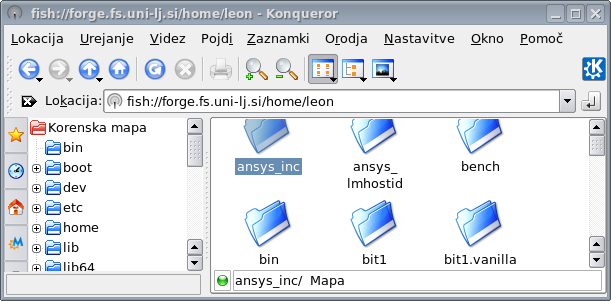 Users can transfer their files using the secure SCP or SFTP protocols and the programs of the same name. For copying data to the \(HOME home directories, direct use of the file server forge.fs.uni-lj.si is recommended; for copying files to the \)WORK and $SCRATCH working directories, use prelog.fs.uni-lj.si. For Windows clients, various graphical programs can be used. Programs such as FileZilla or WinSCP are recommended and are freely available.
WinSCP settings:
User name and password
Host name: forge.fs.uni-lj.si
Protocol: sftp
In Linux there are several graphical file managers (konqueror, dolphin, mc, …) and all of them support file transfer with the SCP, SFTP or FISH protocol. In konqueror, simply type the address into the location bar.
Contact
support @ hpc.fs.uni-lj.si
Uporaba sestava
Kako lahko uporabljamo sestav?
Delo na HPCFS je sestavljeno iz nasledjih poglavitnih področij:
Z NX clientom dostopamo do sestava vsakodnevno in z različnih mest.
Uporabljamo lahko KDE ali Gnome okensko okolje
Najpogosteje uporabljamo Konzolo v katero tipkamo školjčne ukaze
Dodatne programe izbiramo z okoljem modules
Programe poganjamo na vozliščih z okoljem SLURM
Računanje nadzorujemo z grafana.hpc.fs.uni-lj.si
Največ časa pa se prebije pri pridobivanju novih rezultatov, kar običajno pomeni
pisanje školjčnih in SLURM skript s katerimi lahko enostavno ponovimo izračune
razvoj lastnih programov
obdelava in ocenjevanje rezultatov
pisanje poročil, člankov in risanje skic
Za hiter pregled uporabe priporočamo kratka navodila ali vpogled v naslednja podrobneja navodila:
Kje lahko hranim svoje podatke?
Na sestavu so na voljo trije različni tipi datotečnih pomilnikov::
imenik
povezljivost podatkov
opis datotečnega sistema in namen uporabe
Uporabniško dosegljivi datotečni pomnilniki
/home/$USER = $HOME
/home/.zfs/ = $SNAP
deljeno na vsa vozlišča
Visoko kvalitetna RAIDZ2 hramba z omejitvijo količine na 500 GByte. Mrežni diski so deljeni s protokolom NFS na vsa vozlišča (1Gbit Ethernet) in na nadzorno vozlišče prelog (10Gbit Ethernet). Datotečni pomnilnik je sestavljen iz štirih skupin s po 12 diski. V vsaki skupini so štirje redundančni diski, ki omogočajo restarvriranje podatkov ob okvari dveh diskov.
Vsi podatki v teh imenikih se stalno zajemajo in omogočajo restavriranje za nekaj dni in nekaj tednov nazaj. Podatki se hranijo s principom posnetkov (snapshot) na ZFS podatkovnem sistemu. Tako je mogoče dobiti shranjene podatke tudi ob določenih urah. Uporabniki lahko posnetke dosegajo v imeniku $SNAP oziroma backup.
Domači imenik \(HOME je namenjen hrambi pomembnih podatkov. Tako vhodnih podatkov, kot tudi rezultatom. Ni pa namenjen hrambi izpeljanih, vmesnih in začasnih datotek. Uporabniki naj na \)HOME hranijo vitalno pomembne podatke, katere želijo imeti shranjene preko daljšega časovnega obdobja in za katere varovanje skrbi sistem ZFS s svojo redundanco in posnetki, saj se varujejo tudi pred nepazljivimi uporabniki.
/work/$USER = $WORK
deljeno na vsa vozlišča
Ta hranilnik se uporablja za podatke, ki zahtevejo velike količine vhoda/izhoda vaše aplikacije, ki med delom piše rezultate hkrati na vseh vozliščih. Primeren je tudi za aplikacije, ki shranjujejo svoje stanje med delom za primer napake med računanjem (checkpointing). Datotečni sistem je izveden z namenskim LUSTRE podatkovnim sistemom preko balansiranega 2x1Gbit Ethernet omrežja. $WORK je kapacitete 8TB. Z nadgradnjo LUSTRE strežnikov se je podvojila tudi hitrost, ki sedaj praktično dosega teoretične zmogljivosti omrežja. Agregatna hitrost pisanja je tako 1,17GB/s (omejena z 10GbE omrežjem). Hitrost pisanja z enega vozlišča pa 117MB/s.
RAIDZ1 (RAID5) konfiguracija zagotavlja varovanje podatkov pri okvari diskov. Za \(WORK ne obstajajo rezervne kopije kot je to za \)HOME. Uporabniki morajo sami skrbeti za varovanje teh podatkov in seveda za čiščenje odvečnih datotek.
Omejitve na tem pomnilniku so postavljene na 1 TB. V imenik se premaknemo z ukazom cd \(WORK ali izberemo svoj podimenik v /work/\)USER
/sratch/$USER = $SCRATCH
deljeno na vsa vozlišča
Mrežni disk LUSTRE s komunikacijo po Infiniband omrežju je sestavljen iz enega OSS sestava iz 64 iSCSI/iSER diskov vozlišč. Hitrost komunikacije je v primerjavi z \(HOME veliko večja. Hitrost pisanja enega vozlišča na \)SCRATCH je izmerjena na 567 MB/s. V splošnem pa je to diskovno polje namenjeno vsem diskovno intenzivnim poslom. Povezava na nadzorno vozlišče prelog je omejena z 1Gbitnim Ethernet vmesnikom na Lustre vozlišču MDS.
V principu je /scratch pomnilnik ekvivalenten 8xRAIDZ2 (8xRAID6) kar pomeni, da diskovni sistem ob okvari enega ali dveh diskov v vsaki od osmih skupin ne izgubi podatkov. Zanesljivost shrambe je vseeno manjša kot na $HOME saj so diski na vozlščih odvisni od zanesljivosti vozlišč. 16 diskov od 64 je tako redundanca.
Omejitve na tem pomnilniku, do zapolnitve kapacitet, ni. Vseeno pa morajo uporabniki sami skrbeti, da si kopirajo iz/na ta diskovni sistem le pomembne datoteke, ostale pa redno brišejo. V imenik se premaknemo z ukazom cd \(SCRATCH ali izberemo svoj podimenik v /scratch/\)USER
Uporabnik ki želi ta diskovni prostor uporabljati naj si prej naredi svoj imenik z ukazom mkdir $SCRATCH
/shadow/work/$USER
/shadow/tmp
na nadzornem vozlišču prelog
Senčna kopija pomnilnika \(WORK, ki se je brisal v maju 2014. Podatki v teh imenikih so na voljo uporabnikom, da si skopirajo stare datoteke na \)WORK, če jih še potrebujejo. Datoteke \(SHADOW bodo na voljo še najmanj do konca leta 2014. Priporočamo, da se večje količine kopira z rsync in omejitvijo hitrosti, saj je iSCSI diskovje \)SHADOW na ARNES-u. Primer:
cd \(SHADOW ls rsync -arv --bwlimit=10000 moj\_stari\_projekt \)WORK
/tmp
lokalno na vsakem vozlišču
To podatkovno področje je namenjeno začasnim datotekam med izvajanjem del.
Trenutno ni omejitev na tem pomnilniku.
Upraviteljem sestava je dovoljeno brisanje datotek v tem imeniku v primeru, da prične primanjkovati prostora.
Uporabniški računi
Za dodelitev uporabniškega računa je potrebna odobritev. Podrobnosti so na strani http://hpc.fs.uni-lj.si/access
Uporabniški računi se vodijo v NIS (Network Information Service). Navadni uporabniki si lahko zamenjajo geslo z ukazom yppasswd.
Podpora ali vprašanja so zaenkrat možna kar na support @ hpc.fs.uni-lj.si ali z “Novimi zahtevki” na http://trac.lecad.fs.uni-lj.si/hpcadmin
Registracija na spletni strani http://hpc.fs.uni-lj.si/ je potrebna le, če želite kaj od svojega znanja tudi objaviti in s tem pomagati drugim. Predvsem je to zaželjeno za posebne programe, ki se jih bo ali si jih boste nameščali na sestav.
Nameščena programska oprema
Operacijski sistem
Sestav poganja CentOS 6.6, ki je kompatibilna predelava Redhat-Enterprise Linux-a.Sistem za nadzor nalog
Pošiljanje nalog je možno s sistemom SLURM (ki je nadomestil nekdanji Load Sharing Facility (LSF)).Programsko okolje
Nastavljanje sistemsih nastavitev (environment) je mogoče s sistemom Modules.Programski paketi
Za dostopne pakete kot so prevajalniki, okolja za paralelizacijo, numerične knjižnice, znanstvene aplikacije lahko uporabite sistem Modules ali seznam na spletni strani.
Prenašanje datotek
Uporabniki si lahko prenašajo svoje datoteke z varnim protokolom SCP ali SFTP in enakoimenskimi programi. Za kopiranje podatkov na domače imenike \(HOME se priporoča neposredna uporaba datotečnega strežnika forge.fs.uni-lj.si Za kopiranje datotek na delovni imenik \)WORK, $SCRATCH pa prelog.fs.uni-lj.si. Za kliente iz okolja Windows je mogoče uporabiti različne grafične programe. Priporoča se uporaba programov kot sta FileZilla ali WinSCP in sta prosto dostopena.
Nastavitve WinSCP:
Uporabniško ime in geslo
Host name: forge.fs.uni-lj.si
Protocol: sftp
V okolju linux je okenskih upravljalnikov datotek več (konqueror, dolphin, mc, …) in vsi omogočajo prenos datotek s protokolom SCP, SFTP ali FISH. V konkquerorju naslov napišemo kar v vrstico.
Kontakt
support @ hpc.fs.uni-lj.si
- Program Development
- Environment Modules
- Resource Manager - SLURM
- VisIt
- IOzone
- OpenFOAM
- Inkscape
- LaTeX and SVG Images
- Debugging, Analysis and Profiling of Programs
- ANSYS
- Developing programs in the Eclipse environment
- Elmer
- Message Passing Interface (MPI)
- Wolfram Mathematica
- Whiteboard collaboration with NX shadow client
- Shared-Memory Programming with OpenMP
- Platform Managment Console
- R
- Obsolete