sonicFoam tutorial
Instructions for running the sonicFoam tutorial
(Programmer’s Guide, 3.3 Supersonic flow over a forward-facing step, P-58)
First, prepare the working environment by loading OF:
module load openfoam
source $foamDotFile
Move to the working directory:
cd $FOAM_RUN/tutorials/compressible/sonicFoam/laminar/forwardStep/
Create the mesh:
blockMesh
Copy decomposeParDict from the damBreak tutorial into the system/ subdirectory:
cp $FOAM_RUN/tutorials/multiphase/interFoam/laminar/damBreak/system/decomposeParDict $FOAM_RUN/tutorials/compressible/sonicFoam/laminar/forwardStep/system/
Edit decomposeParDict for the desired number of processors (e.g. 24):
gedit system/decomposeParDict
 numberOfSubdomains 24;
method simple;
simpleCoeffs
{
n ( 6 4 1 );
delta 0.001;
}
Save and close.
Prepare the mesh for parallel computation:
decomposePar
The simulation can be run in two ways:
sbatch --partition=rome --ntasks=24 --ntasks-per-core=1 --wrap="mpirun sonicFoam -parallel"
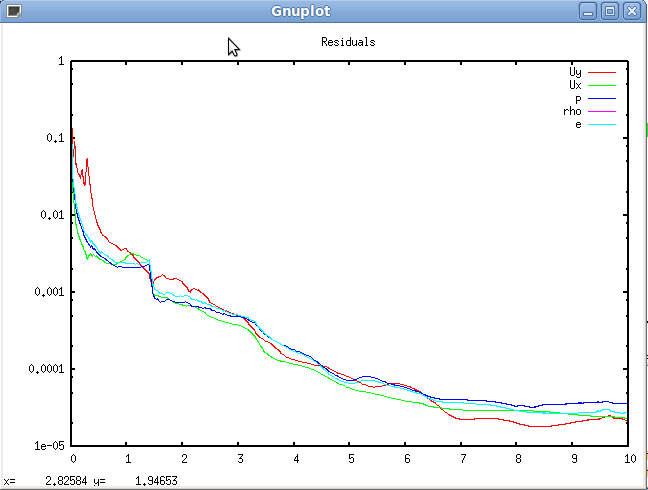
or with pyFoam (e.g. for plotting residuals)
 module load python/2.7.3
pyFoamPlotRunner.py --procnr=24 sonicFoam
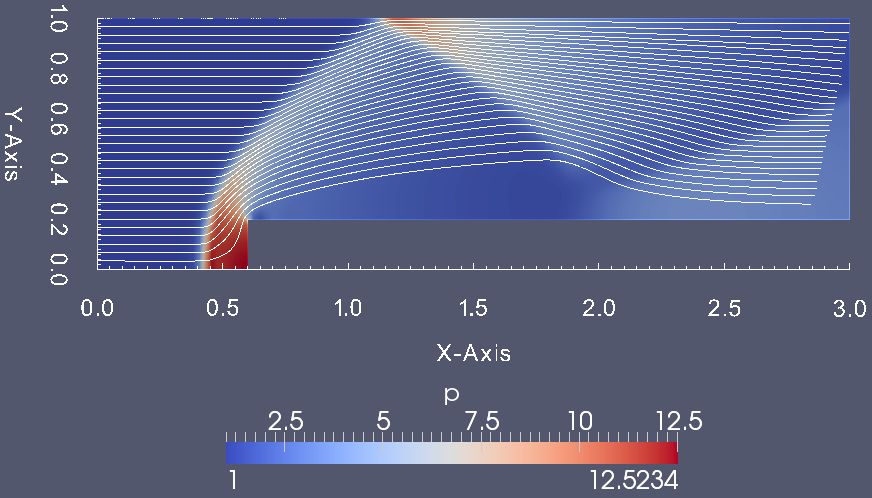
Post-processing is done in ParaView:
 reconstructPar
paraFoam
sonicFoam tutorial
Navodila za poganjanje sonicFoam tutoriala
(Programmer’s Guide, 3.3 Supersonic flow over a forward-facing step, P-58)
Najprej si pripravimo delovno okolje, tako da naložimo OF:
module load openfoam
source $foamDotFile
Premaknemo se v delovni direktorij:
cd $FOAM_RUN/tutorials/compressible/sonicFoam/laminar/forwardStep/
Naredimo mrežo:
blockMesh
Skopiramo decomposeParDict iz damBreak tutoriala v poddirektorij system/:
cp $FOAM_RUN/tutorials/multiphase/interFoam/laminar/damBreak/system/decomposeParDict $FOAM_RUN/tutorials/compressible/sonicFoam/laminar/forwardStep/system/
Uredimo decomposeParDict za željeno število procesorjev (npr. 24):
gedit system/decomposeParDict
 numberOfSubdomains 24;
method simple;
simpleCoeffs
{
n ( 6 4 1 );
delta 0.001;
}
Shranimo, zapremo.
Pripravimo mrežo za paralelno računanje:
decomposePar
Poganjanje simulacije lahko opravimo na dva načina:
sbatch --partition=rome --ntasks=24 --ntasks-per-core=1 --wrap="mpirun sonicFoam -parallel"
ali s pyFoam-om (npr. zaradi risanja ostankov)
 module load python/2.7.3
pyFoamPlotRunner.py --procnr=24 sonicFoam
Postprocesiranje izvedemo v ParaView-u:
 reconstructPar
paraFoam