Invention Machine Goldfire Innovator
 The Goldfire software package by Invention Machine aims to combine the steps on the path to innovation into a coherent whole. It oversees the product from the first queries and search for ideas to solutions for a new generation of products that will become relevant only in a few years. When searching for information and conceptual designs, advanced search is available with support for sentence structures that the search engine is able to distinguish, so searches can be formulated as questions, to which the program tries to find answers in a rich collection of patents, on various web pages or in knowledge bases that we have built with semantic indexing of data. The package also has a built-in dictionary and translator for four languages (English, German, French and Japanese), which enable simultaneous searching in several languages, and summaries of the search results can also be translated if desired. Classic keyword search can also be used in the program. The program follows the theory of inventive problem solving, which is based on the assumption that all innovations can be generalised to the basic physical phenomena on whose principles they are based. Patents thus represent the resolution of technical contradictions, where two quantities are inversely proportional. Using tools developed with this theory (innovation principles, scientific effects, system change patterns), we look for a general solution. This is then applied to the specific problem. For proper treatment of a problem, we can use a model in which the system under consideration is shown schematically with building blocks and links between them, and in which problematic links are formed automatically. In addition to finding new solutions, the program can be used to predict failures or damage, based on the included risk tables according to the FMEA, FMECA, HAZOP and HACOP standards.
By clicking on the attached images, you can view some screenshots of the program in more detail.
Figure 1: main window displayed when the program starts
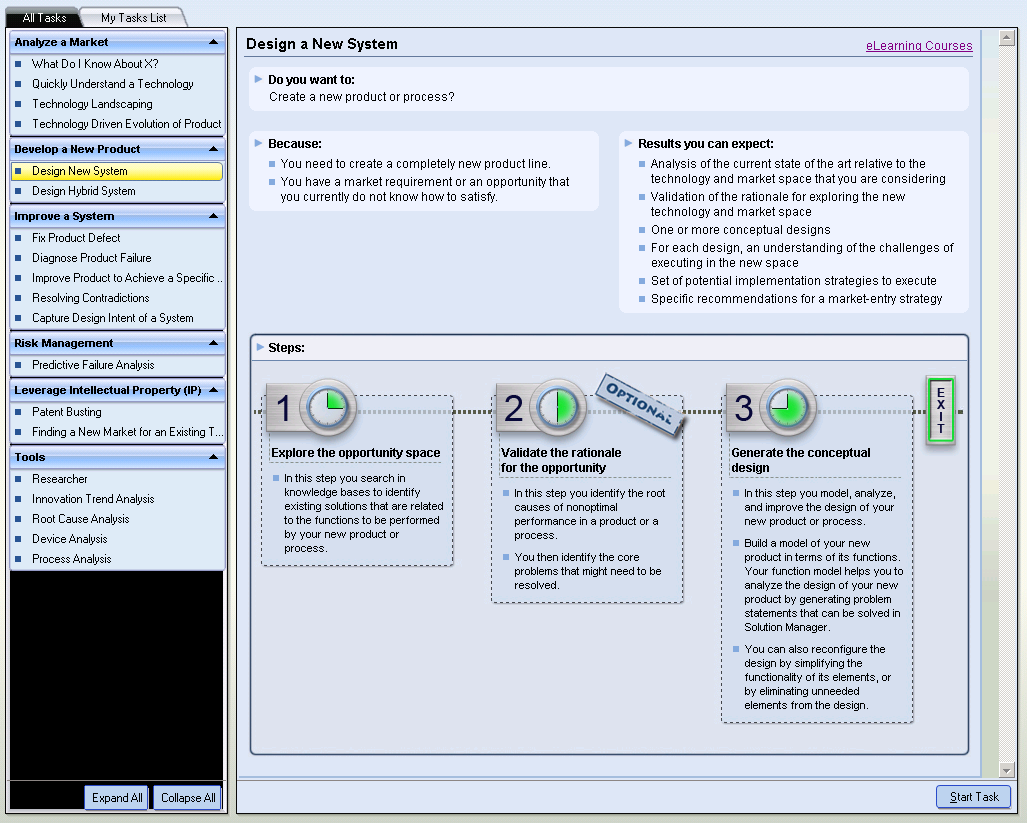
Figure 2: tasks tab
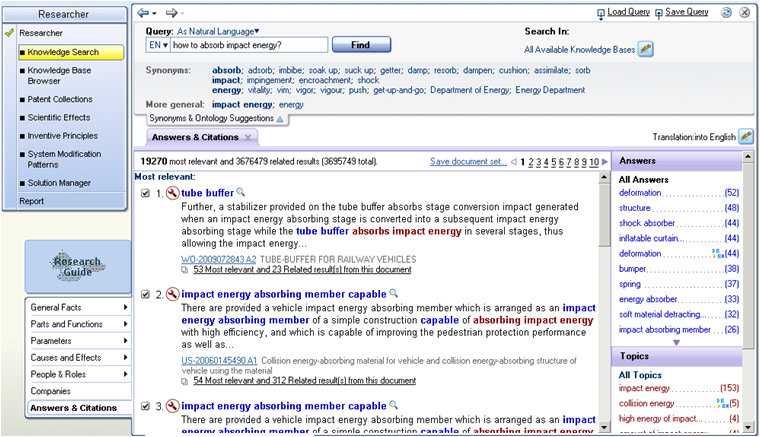
Figure 3: explorer - search window
Figure 4: overview of company activity based on filed patents
For more information and access to the program on the goldfire.hpc virtual machine, contact Jernej Klemenc .
Access to the goldfire virtual machine is via the prelog login node. In the NX client, create a new session named goldfire and select the Windows (RDP) desktop in the settings. In the detailed desktop settings, set the server name goldfire and the username (administrator or gfuser) with the corresponding password, as shown in the screenshot below:
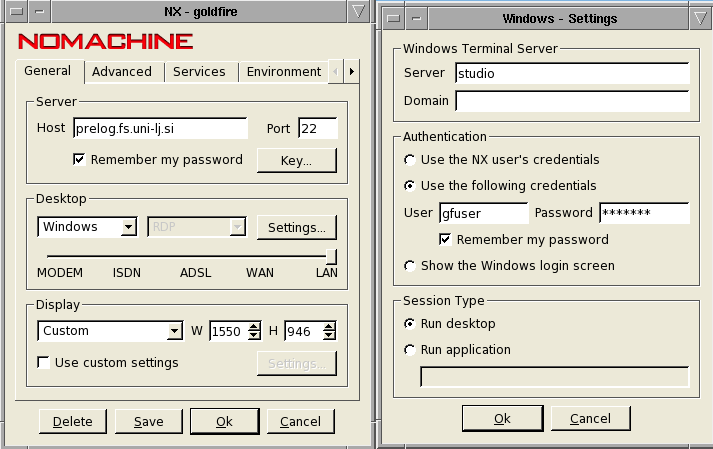
You can obtain the password for gfuser from your supervisor or the head of your project/programme/laboratory. When connecting, select a new session (NEW) or connect to an existing one (Windows RDP), if it already exists.
Examples of database searches:

Invention Machine Goldfire Innovator
Programski paket Goldfire podjetja Invention Machine želi v smiselno celoto združiti korake na poti do inovacij. Nad izdelkom bdi od prvih poizvedb in iskanja idej do rešitev za novo generacijo izdelkov, ki bo aktualna šele čez nekaj let. Pri iskanju informacij in idejnih zasnov nam je na voljo napredno iskanje s podporo za stavčne strukture, ki jih je iskalnik sposoben razločiti, zato lahko pri iskanju informacij zastavimo iskanje v obliki vprašanj, na katera program skuša najti odgovore v bogati zbirki patentov, na raznih spletnih straneh ali v bazah znanja, ki smo jih sestavili s semantičnim indeksiranjem podatkov. V programski paket sta vgrajena tudi slovar in prevajalnik za štiri jezike (angleščina, nemščina, francoščina in japonščina), ki omogočata hkratno iskanje v več jezikih, po želji pa povzetke rezultatov iskanja lahko tudi prevedemo. V programu lahko uporabimo tudi klasično iskanje po ključnih besedah. Program sledi teoriji reševanja inovatorskih nalog , ki temelji na predpostavki, da se da vse inovacije posplošiti na osnovne fizikalne pojave, na principu katerih so zastavljene. Patenti tako predstavljajo reševanje tehničnih nasprotij, kjer sta dve veličini obratno sorazmerni. Z uporabo orodij, razvitih s pomočjo te teorije (principi inovacij, znanstveni učinki, vzorci sprememb sistema), iščemo splošno rešitev. To potem apliciramo na konkreten problem. Pri ustrezni obravnavi problema si lahko pomagamo z modelom, v katerem z gradniki in povezavami med njimi shematsko prikažemo obravnavan sistem, v katerem se problematične povezave oblikujejo samodejno. Poleg iskanja novih rešitev lahko s programom predvidimo odpovedi oziroma poškodbe, in sicer na podlagi vključenih tabel tveganj po standardih FMEA, FMECA, HAZOP in HACOP.
S klikom na priložene slike si lahko podrobneje ogledamo nekaj posnetkov zaslonov programa.
Slika 1: osnovno okno, ki se prikaže ob zagonu programa
Slika 2: zavihek z nalogami
Slika 3: raziskovalec - okno za iskanje
Slika 4: pregled aktivnosti podjetij glede na prijavljene patente
Za podrobnejše informacije in dostop do programa na navideznem stroju goldfire.hpc se obrnite na Jernej Klemenc .
Dostop do navideznega stroja goldfire oteka preko vstopnega vozlišča prelog. V klientu NX naredimo novo sejo z imenom goldfire in v nastavitvah izberemo namizje Windows (RDP). V podrobnejših nastavitvah namizja nastavimo ime strežnika goldfire ter uporabniško ime (administrator ali gfuser) s pripadajočim geslom, tako to je prikazano v spodnjem posnetku zaslona:
Geslo za gfuser dobite pri svojem mentorju ali vodji projekta/programa/laboratorija. Pri povezovanju nato izberemo novo sejo (NEW) ali se povežemo na obstoječo (Windows RDP), če le ta že obstaja.
Primeri iskanja v bazi podatkov: